Traffic Analyzer Plus
Network Traffic Analysis Solution
The growing need for extensive internet usage and access to various websites in the workplace has created a new concern for managers and administrators in both public and private organizations. Users in these organizations, through access to the corporate internet, may create records and activities under the organization’s IP addresses. If these activities lead to data leakage or criminal acts by a user connected to the internet, responsibility will fall on the senior manager of the organization. IT administrators therefore need a network traffic analysis system to log users’ online activities so that, when necessary, they can identify the responsible user and provide evidence to the relevant authorities. In addition, organization managers, as supervisors of employee online activity, need a system that delivers qualitative reports on these activities while ensuring the security of the network and organizational data.
What is Traffic Analyzer Plus?
Traffic Analyzer Plus is a network traffic analysis solution and a new product designed to enhance the advanced capabilities of IBSng software. This system allows you to view the websites visited by network users along with their URLs. Traffic Analyzer Plus provides a powerful traffic analysis system that collects network port information and displays it in a unified panel. This includes port 443 traffic, which uses the TLS/SSL security protocol.
To trace end-user activities, sent and received traffic must be associated with a specific user rather than just an IP address. Mapping IP addresses to usernames manually is time-consuming and error-prone. Traffic Analyzer Plus performs this process automatically.
Traffic Analyzer Plus allows you to view traffic based on subnet IP and its attributes such as protocol and service type. With this feature, you can analyze the traffic of each organizational unit separately.
Features of Traffic Analyzer Plus
Display of visited website domains and URLs
Support for HTTPS and HTTP protocols
Network Traffic Analysis
Transit Bandwidth Monitoring
Logging traffic of visited websites on a per-user basis
Data collection from NetFlow and sFlow protocols
Real-time monitoring of pages visited by users
Search based on traffic passing through a specific router
What information is visible in Traffic Analyzer Plus reports?
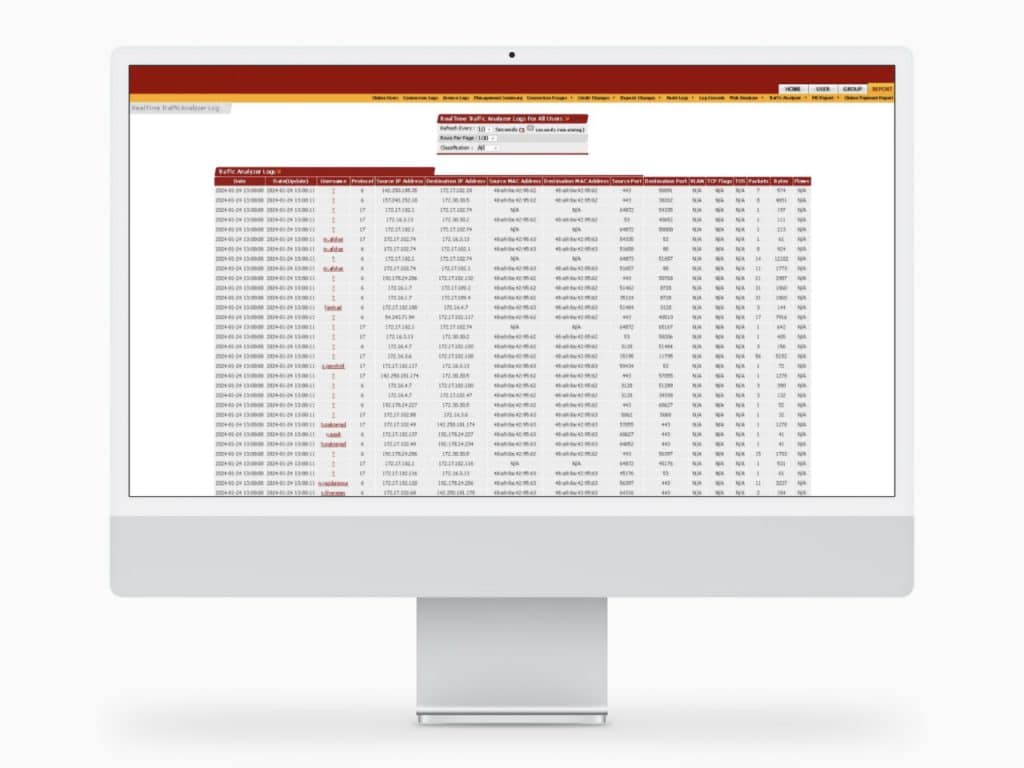
Reports provide access to the start and end time of each session, session duration, source and destination IPs, visited website URLs, source and destination ports, packet volume, protocol type, TCP flags, and more. The system can also collect different types of passing traffic including website browsing, web applications, social networks, SSH, torrent traffic, and more. Traffic Analyzer Plus can archive user traffic logs for more than 12 months, and even after several months, this archive can still provide valuable insight into your network security issues. To trace end-user activities, sent and received traffic must be associated with a specific user rather than just an IP address. Mapping IP addresses to usernames manually is time-consuming and error-prone. Traffic Analyzer Plus performs this process automatically. It also allows you to view traffic based on subnet IP and related attributes such as protocol and service type, enabling separate analysis of each organizational unit’s traffic.
How does Traffic Analyzer Plus work?
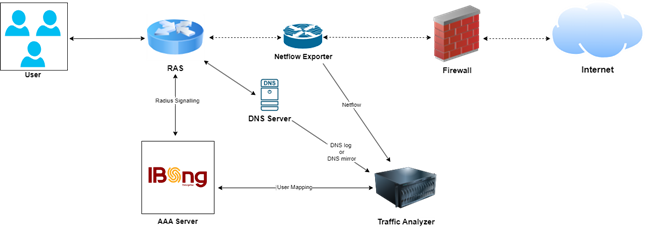
NetFlow is a network protocol used to monitor traffic flows across a network. By analyzing NetFlow data, you can gain insight into how network traffic moves, including traffic sources and destinations, congestion points, and usage volume. Traffic Analyzer Plus integrates with network devices, collects NetFlow data, processes it, and presents it in dashboards and reports.
In practice, the Traffic Analyzer Plus server uses the NetFlow protocol to receive the headers of users’ transmitted packets and record their browsing logs. With the help of DNS server logs, it maps the IP addresses of websites visited by users to their URLs and displays them. For Traffic Analyzer Plus, it does not matter how many routers your organization’s traffic passes through; as long as NetFlow data from user traffic is sent to the Traffic Analyzer Plus server, user traffic logging and analysis remain possible.